
Imagine you’re Paul Revere, riding from Boston to Lexington to warn citizens that the redcoats were coming. He may not be as fast as computer networks today, but Paul Revere was essentially acting much like a broadcast would- he was relaying his message to the entire town of Lexington.
A broadcast, in particular, is a simple message that is sent to all clients on a local area network. But just exactly what enables a network to broadcast a message to every single client on the network?
What is a Broadcast Address?
A broadcast address is an address used to indicate that information being sent out should be delivered to every client on the local area network. These addresses are always the highest number possible in a particular network address or subnet. We’ll cover subnets later, for now let’s take a closer look at the most common broadcast address: Data Link Layer broadcasts.
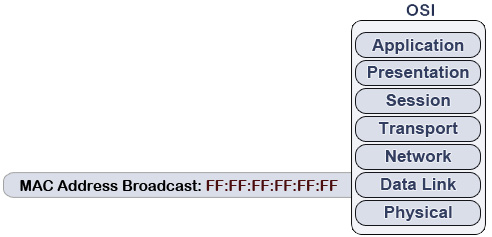
Broadcasts on the Data Link Layer correspond to MAC addresses. MAC address broadcasts are generally the easiest to understand, since they aren’t affiliated with IP addresses or subnetting. In fact, all you really need to remember is FF:FF:FF:FF:FF:FF. Whereas this MAC address would normally be comprised of different hexadecimal values, it is instead simply all F’s. (As we know, each F stands for the highest number in hexadecimal: 15)
When a MAC address broadcast is sent out, each network interface card on the local area network will see the broadcast address and automatically pass the information up to the upper layers of the OSI model. So far it’s simple- right? Now let’s get back to the subnetting and IP address topics that are present on the Network Layer.
How IP Broadcasts are Sent via the Network Layer
Remember how we stated that broadcast addresses are always the highest-most number in an address range? IP broadcasts are no exception! On a network that isn’t subnetted, we can simply place 1’s in place for each bit in the host portion. The result: our very own broadcast address!
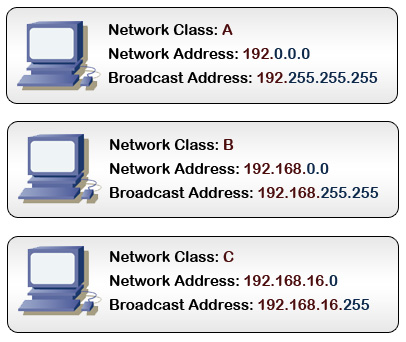
Things are still fairly simple: simply replace each host portion with the highest number you can create with 8 bits: 255. Notice that the network portions do not change- just the host portions.
Sadly, this is where things start to get a little trickier: we need to find the broadcast address of a subnetted network.
How to Find the Broadcast Address of a Subnetted Network
We need two things to find the broadcast address of a subnetted network: an IP address, and the subnet mask. The process is simple: find the inverse of the subnet mask. Then take the result, and logically OR it with the IP address to get the broadcast address.
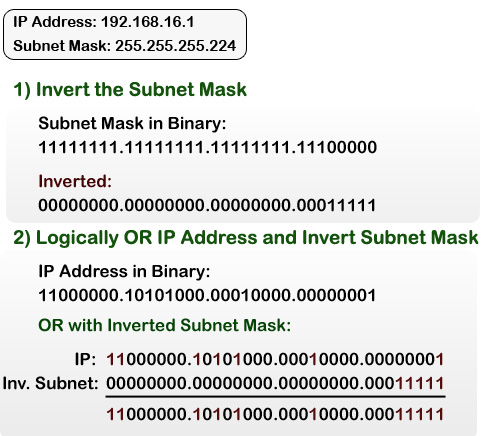
Of course, we can convert the above binary result to decimal and get the broadcast address of 192.168.16.31. If you aren’t familiar with the OR process, it’s rather simple. If there is a 1 in either the IP or subnet field, then the result will always be a 1. (Otherwise, the result is 0)
Now we know how to find the broadcast address and how it works- but what is it used for?
What are Broadcast Addresses used for?
Broadcasts are generally used for several reasons:
-
- Address Resolution Protocol (ARP) uses broadcasts to map physical addresses to logical addresses. To build the table of hosts, a device needs to send a broadcast to every other device on the network to essentially find out who is where.
-
- Several types of network protocols and services use broadcasts in the same way. Dynamic Host Configuration Protocol (DHCP), for instance, requires that broadcasts be used to dynamically assign an IP address to computers on a network.
-
- Routing protocols such as Routing Information Protocol (RIP) use broadcasts to send out “advertisements.” This advertisement is used by routers to map out the topology of a network, so that data can be routed to the appropriate place accordingly. (Interesting enough, this protocol will attempt to find the fasted route through a network to a destination, based on how many “hops” it takes to get from the sender to the receiver.)
Final Points of Interest on Broadcasts
Keep in mind that broadcasts will travel to every single client on a network- at least, until a router is encountered. A router is the only device that can separate a broadcast domain. Logically, this is mandatory for the internet to exist. What do you think would happen if broadcasts were being sent from network to network- all over the internet? (Hint: no more Internet.)
Also make note that broadcast addresses should never be used as host addresses. This can be confused in subnetting, where it isn’t always clear where the host portion starts and ends. The broadcast address is reserved as the highest value- and likewise, no IP address should use a broadcast address or problems will arise.



What about a Layer 3 Switch will it stop the broadcast?
Excellent article. Very clear explanation and easy to understand for a novice like me. Thanks a lot.
A layer 3 switch is pretty much just a router, so yes, it will stop the broadcast.
its good.
awesome clarity of the topic…
a biiiiig thanks
studying for CCNA Cert., taking class, etc.
was stuck all weekend on this, racking brains, etc., could not find the pattern
simple ‘n’ easy to use, works like a charm
will be perusing this website for further tips and tutorials
thanks again
I enjoyed this article. Explained a lot. Wasn’t not aware of the usefulness of inverting the subnet. Affords some interesting combinations, and discoveries. Understanding networking from the point of view of ones-and-zeroes is very interesting, and essential to a complete networking understanding.
thanks!
felipe
This article gave the best understanding for broadcasting which i had been confused a while.
Thanks for this article.
so nice this article..
Dear Sirs
Thanks a lot for your article that has clarified to me
the concept of broadcast address.
but unhapply you did a mistake.when you put your examples.You say:
Network class A :192.0.0.0
Nerwork class B :192.168.0.0
A network class A or B can not start with 192
Almost every network student knows that class A goes from 1 to 126
and clas B goes from 128 to 191 in the first octet.Eventually
with your addresses you can lead to confusion to beginners
Have a nice day
Daniel
Wonderful….i had no problems in understanding it…i really enjoyed it…
Thank You very much
ohhh very nice info
very informative article..
but can you please give little explanation on this
What do you think would happen if broadcasts were being sent from network to network- all over the internet?
its good. understood nicely.
The explanation is good.Very simple to understand also Daniel comment noted
@waheeda..
if the broadcast travels a router, then each and every node in this entire world has to listen each and every broadcast which were generated by each and every other nodes. ( node-networking device)
so, the entire world will only be listening to broadcast… lol
So why there is no reaction to Daniel’s mail yet? Perhaps you should update your article, ah?
Hi!
If u have host adresses in the range .0 – .255
Can i use .255 wich is the broadcast adress in a WAN’s broadcast?
nice tnx 😀
If “a switch is pretty much just a router, so yes, it will stop the broadcast” how can the devices receive the broadcast on a switched network? I mean, if my pc sends a broadcast packet, the first thing the packet will hit on a switched network, will be the switch and if the switch stop the broadcast, how the other host are supposed to receive the broadcast?
Clearly this is written by someone is learn(ing)-networking.com
I’m glad that someone (Daniel) already seen this huge mistake about classes. Classes refer to IP addresses NOT subnetmasks.
Lieven- this was a simple syntax error in my image editing software. Although, I’ll say that I appreciate your comment as it has led me to fix the error 🙂
And thanks Daniel, not sure why I didn’t read your comment better the first time.
Regarding the discussion on classful networking:
Classful networks were abandoned in 1993 in favor of CIDR block allocations.
Before 1993, Lieven and Daniel would be correct (almost 😉 ) : class-A networks were from 0.0.0.0 to 127.255.255.255, B from 128.0.0.0 to 191.255.255.255, etc…
After 1993, CIDR blocks allowed for a more efficient allocation of addresses by allowing the break up of larger A’s and B’s into smaller and more incremental segments than the traditional classes allowed. You should know this as slash notation (192.168.1.0/24)
In modern networks, Class A, B and C’s are essentially colloquial terms to describe the major CIDR blocks at /8 (A), /16 (B) and /24 (C).
So in the above example of 192 addresses, while maybe not as clear as he could be if he used CIRD slash notation, he is in fact corect given that the article was written after 1993.
i want to find who sent the broadcast message?
i mean that from which system the message was came?
QUESTION: If two subnets (10.1.1.0/24, and 10.1.2.0/24) are connected through a router/gateway; and a host (10.1.1.100) sends a frame to a “10.1.2.255” destination address; will it get passed (i.e., routed) to the connected domain and get distributed (broadcast) there?
This is a corner case of interest, that currently seems ambiguous to me. Anyone that knows for sure, please advise. Thank-you.
@Vern: for router to broadcast to hosts in 10.1.2.0/24 subnet, ‘ip directed-broadcast’ has to be enabled on the interface. by default, it is disabled.
http://www.cisco.com/en/US/docs/ios/12_3/ipaddr/command/reference/ip1_i1g.html#wp1081245
Thanks so much for this explanation. Keep em coming.. Hey…. by the way ..I am really thinking about making a career move .. I currently work in real estate but have been self educating in networking over the last couple months and seem to have a knack for it.. I was told by many certification schools that it is really a good job market out there but that I will need a few certifications to break in…. I know they want to make some sales and am a little skeptical….They told me that if I got my net+,ccna and mcitp I could easily find a job and in a few years be making over 50k. Would anybody out there care to comment about this.
Thx so much and god bless…